
28 – Veeam Backup for Azure: A Hub-and-Spoke Deployment Checklist
Preface:
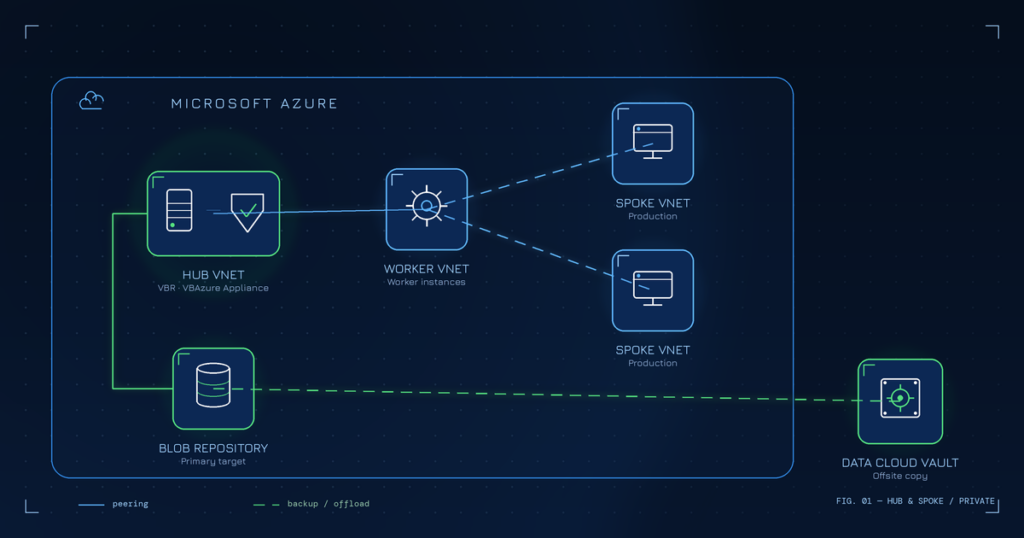
A while ago I was asked by an enterprise customer from Europe to design a Veeam backup solution for their Microsoft Azure environment. The setup was a classic Hub-and-Spoke architecture, and the goal was clear: leave the on-premises vSphere platform behind and run all workloads in Azure instead. Before any of that would happen, the customer wanted a proper backup design in place — built on Veeam Backup for Microsoft Azure (VBAzure) — so the new cloud workloads would be protected from day one.
The migration itself was not part of my engagement. My job was the design and, more relevant for this post, a deployment checklist the team could work through step by step to stand up VBAzure in a private, hub-and-spoke Azure environment. I have done a fair number of on-prem Veeam designs over the years, but a “cloud-first, private-networking-only” VBAzure deployment has a few specifics that are easy to miss if you only know the classic VBR world — private endpoints, DNS zones, worker placement and Disk Access being the usual suspects.
I figured this checklist might be useful to others facing the same task, so I cleaned it up, removed everything customer-specific, and verified every step against the current Veeam documentation. What follows is the anonymized result.
Disclaimer:
This is based on a real customer project, but all customer-specific details have been removed — everything here is generic and reflects my own experience, not the views of my employer or the customer. As always: test everything in your own environment before you rely on it, and check the official Veeam Helpcenter for the version you actually run. This was written and verified against VBAzure v8.1.
Phase 0 – Design decisions (fix these before you deploy):
- Decide subscriptions:
- Hub (shared services / VBR / VBAzure appliance)
- Spoke(s) (production workloads)
- Optional: separate backup or worker subscription
- Decide regions:
- One region per VBAzure appliance (recommended)
- Workers deployed per protected region
- Decide connectivity model:
- Hub-and-spoke with VNet peering
- No public IPs for VBAzure components
- Decide offsite strategy:
- Azure Blob only, or
- Azure Blob + a separate offsite target (e.g. Veeam Data Cloud Vault)
- Confirm private deployment is mandatory (no public endpoints)
Phase 1 – Azure hub network foundation:
- Create Hub VNet:
- Subnet:
backup-management(VBR + VBAzure appliance) - Subnet: (optional)
shared-services
- Subnet:
- Create Spoke VNet(s) (per workload region):
- Subnet:
production - Subnet: (optional)
private-endpoints
- Subnet:
- Configure VNet peering:
- Hub ↔ every spoke
- Allow forwarded traffic
- Allow gateway transit (if ExpressRoute/VPN is used)
- Confirm DNS strategy:
- Azure Private DNS (recommended)
- Central DNS hosted in the hub
Phase 2 – Private DNS zones (critical for VBAzure):
Create once, usually in the hub subscription.
- Create the mandatory Private DNS zones (required for any private deployment):
privatelink.blob.core.windows.netprivatelink.queue.core.windows.net
- Create the conditional zones — only if you protect those workloads:
privatelink.file.core.windows.net(Azure Files)privatelink.database.windows.net(Azure SQL)privatelink.postgres.cosmos.azure.com(Azure Cosmos DB for PostgreSQL)
- Link all hub + spoke VNets that must resolve private endpoints:
- Enable auto-registration for the worker VNets
Phase 3 – Identity & permissions (Entra ID):
- Identify the temporary setup account:
- Global Admin (only needed to bootstrap the Entra ID app / grant admin consent)
- Subscription Owner or User Access Administrator
- Decide the service account model:
- Auto-created by Veeam, or
- Pre-created Entra ID app (least privilege — and avoids needing Global Admin)
- If pre-created:
- Create the Entra ID app registration
- Prepare the custom role per Veeam docs
- Assign at subscription scope
- Ensure the account can:
- Create disk snapshots
- Create Disk Access resources
- Create Private Endpoints
- Manage Storage Accounts
Phase 4 – Deploy the VBR server (Windows in Azure):
- Create a VM in the hub VNet:
- Windows Server
- Size per scale (e.g.
D8as_v6or larger) - No public IP
- Attach disks:
- OS disk
- Data disk (repos, cache, logs)
- Harden the OS:
- Patch the OS
- Disable unnecessary services
- Configure NTP
- Install Veeam Backup & Replication:
- Latest supported version
- Enable console + web UI
- Validate outbound access:
- Entra ID
- Azure Resource Manager
- Veeam update repositories (via NAT Gateway or proxy)
Phase 5 – Deploy the VBAzure appliance (private mode):
- In the VBR console:
- Add the Microsoft Azure plug-in (if not already present)
- Deploy the VBAzure appliance:
- Connection type: Private IP
- VNet: hub
backup-managementsubnet - NSG: allow inbound TCP 443 from the VBR server only
- No public IP
- Appliance sizing:
- In v8.1 only B2ms, F4s_v2 or F8s_v2 are selectable — start with
F4s_v2, orF8s_v2for large estates, and check the sizing guide - Resize later if needed
- In v8.1 only B2ms, F4s_v2 or F8s_v2 are selectable — start with
- After deployment:
- Record the Veeam Backup Appliance ID (Azure VM tag)
Phase 6 – Enable private network deployment:
- Open the VBAzure Web UI:
- Configuration → Deployment Mode
- Enable:
- Private network deployment
- (Optional) Auto-create service endpoints (
Microsoft.Storage.Global)
- Wait for completion before proceeding
Phase 7 – Storage accounts & private endpoints:
Worker configuration storage (per region)
- For each worker region:
- Create a Storage Account
- Enable Blob + Queue
- Disable public access
- Disable soft delete
- Default tier: Hot
- Add tag:
Veeam Backup Appliance ID = <ID>
- Create Private Endpoints:
- Blob → worker VNet
- Queue → worker VNet
- Register in Private DNS
Backup repositories (per region)
- Create a Storage Account for backups:
- Same region as the workers (avoid egress cost)
- Blob only
- No public access
- Create a Private Endpoint:
- Blob → worker VNet
- Register in DNS
- Add the repository in VBAzure
Phase 8 – Disk Access (private snapshot access):
- Confirm the deployment model:
- Same subscription → Disk Access auto-created
- Cross-subscription → manual Disk Access required
- For manual:
- Create the Disk Access resource
- Create a Private Endpoint
- Approve the PE connection
- Register in DNS
- Validate limits:
- Disk Access resources per region
- Snapshot concurrency — a single Disk Access resource can process only a limited number of disks/snapshots at once (an Azure limitation); check Veeam’s Considerations & Limitations page for the current value
Phase 9 – Worker configuration:
- In VBAzure:
- Add a Worker Configuration per region
- Select:
- Worker VNet
- Subnet
- Storage Account
- Profile (CPU/RAM)
- Create custom worker profiles:
- Based on VM size / disk count
- Avoid defaults for large estates
Phase 10 – Network & firewall validation:
- NSGs allow:
- VBR → VBAzure: TCP 443
- Workers → Storage (via Private Endpoint)
- Appliance → Entra ID / ARM / updates
- Confirm no public endpoints exist:
- Appliance
- Workers
- Storage
- Validate DNS resolution from:
- VBR
- Appliance
- Worker subnet
Phase 11 – Backup policies:
- Create a policy per SLA tier:
- Snapshot frequency
- Backup frequency
- Retention
- Target repository
- Scope:
- Subscription
- Resource groups
- Tags (recommended)
- Enable:
- Application-aware processing (where required)
- File-level restore support (requires peering)
Phase 12 – Restore & validation:
- Test restore scenarios:
- Full VM (same region)
- New VM
- Disk restore
- File-level restore
- Validate:
- Worker deployment
- DNS resolution
- Disk Access usage
A couple of notes from the field:
- You need an Azure account with sufficient rights to bootstrap the setup. Global Administrator is only required to create the Entra ID application and grant consent — pre-creating the app registration lets you avoid it and keeps you closer to least privilege.
- Plan the regional placement of resources carefully and keep the backup infrastructure aligned with the regions of the workloads it protects. This keeps data available and avoids unnecessary cross-region egress.
Key reference links (Veeam Helpcenter, v8.1):
- Private network deployment: https://helpcenter.veeam.com/docs/vbazure/guide/private_network_deployment.html?ver=8.1
- Appliance & private network config: https://helpcenter.veeam.com/docs/vbazure/guide/app_private_network.html?ver=8.1
- Ports & firewall rules: https://helpcenter.veeam.com/docs/vbazure/guide/ports.html?ver=8.1
- Service account permissions: https://helpcenter.veeam.com/docs/vbazure/guide/service_account_permissions.html?ver=8.1
- Appliance sizing: https://helpcenter.veeam.com/docs/vbazure/guide/sizing_appliance.html?ver=8.1
- Worker network configuration: https://helpcenter.veeam.com/docs/vbazure/guide/worker_configuration_network.html?ver=8.1
- Backup repositories: https://helpcenter.veeam.com/docs/vbazure/guide/backup_repositories.html?ver=8.1
- Considerations & limitations: https://helpcenter.veeam.com/docs/vbazure/guide/limitations.html?ver=8.1